
- Categories and Tags are for your visitors, not just search engines. Think of your visitors’ needs first.
- Categories and Tags are about navigation and sorting, grouping your content to help visitors find related information.
- Categories and Tags are not fashion statements. Don’t be colorful or imaginative with either.
- Categories are your site’s table of contents.
- Categories help identify what your blog is about.
- Categories represent your body of work on the subject.
- Categories are not for you, they are for your reader.
- Categories help reader know if they are in the right place.
- Categories must encompass collected groups of information.
- Categories must be specific enough to help visitors understand the content within, while not being too general or vague.
- A category that dominates a blog may need to be spun off to a separate blog.
- Categories with only one post tells the reader you don’t know much about that topic.
- Tags are your site’s index words.
- Tags are micro-data or meta-data, more specifically micro-categorization for your site’s content.
- Tags were indexed by Technorati and others as “keywords” and today are just part of the collection of data indexed by search engines with little or no special relevance.
- Search engines do not recognize or reward the
rel="tag"which identifies a tag, though there is hope. - If you can’t write five blog post titles/ideas on a topic, then it’s a tag not a category.
- If enough posts have the same tag, and it represents your blog purpose and goals, it’s a category. Typically the number is a minimum of 25 posts for a tag to qualify as a category.
NOTE: All categories and tags must link to content on your site, through built-in features or WordPress Plugins. Not sure if they link to your content, test it.
The History of Keywords, Categories, and Tags
 To get into a search engine, you used to just have a solid content, structure, and keyword development and manually submit your website to the search engines and then wait for them to come cruising through with their robots and spiders. Then came Search Engine Optimization (SEO) which brought with it a more focused attempt for page ranking which considered link exchanges and link popularity, followed closely behind by trackbacks, and pingbacks and their validity as ways to determine the “value” of a site, since the assumption was that the more ways a site was interconnected to other sites, the more value is is presumed to have.
While links had their way with SEO, categories were a natural evolution as they helped to group related content together as sites increased their content. This helped visitors identify the areas of interest to them. The more the content expanded beyond a sole purpose, and the more complicated the sites became, the more categories were necessary. The more specific the categories related to a visitor’s interest, the more “sticky” the site might be as people would spend more time exploring the related content.
As a site develops, it begins with simple categories. On this site, the core categories are:
Over time, I’ve added more subcategories to further group related content together. Under WordPress News, I’ve added WordCamps and WordPress Events to help people find more information on specific news within the WordPress Community.
You can add more categories and subcategories and even sub-sub-categories to group content on your site, however, as a site grows, this becomes unwieldy. Enter tags to help micro-categorize the content.
 For the web world, 2005 was declared to be the year of the tag. Bloggers and webmasters were trying to understand what it meant for categorizing their content, but most of all, just like they did with links and SEO, they wanted to figure out how to manipulate tags for better page ranking.
Tags are ways of micro-categorizing your content with links, assigning a “tag” to a link to represent its categorization, if you will. As of 2005, the only services using tags specifically to index content and organize them were Del.icio.us, Technorati, and Flickr.
Technorati was the driving force behind the push for tags on blogs. Its goal was to take on Google and Yahoo and change how we searched for information. Instead of just putting in a specific keyword or phrase, we could actually drill through related content with tags. Tags would be nested under general to specific to help you find the information you needed. While in theory this is great, drilling through random tags and groupings didn’t speed up the search process, only bogged it down.
In theory, tags are micro-categorization of content. That’s what they are for, but let’s really break this down.
A tag is a reference in a link designated by the use of rel="tag" in the link such as:
<a title="WordPress Support Forums" href="http://www.wordpress.org/support" rel="tag">WordPress Support Forums</a>
To break the link down as a tag, you have the following elements:
- The HTML
awhich designates this as an HTML anchor tag, better known as a “link.” - The title of the link, a required web standard attribute, which describes the link and/or destination of the link. This is indexed by search engines.
- The
hrefidentifies the actual URL link address for the browser and reader. - The
rel="tag"attribute instructs search engines, web crawlers, and bots that this link is designated as a “tag.” - The anchor or link text, WordPress Support Forums, displays visibly on the page. It is indexed by search engines as the link text and nothing more, but designated as the tag word or phrase if the tag was recognized as such.
The text within the anchor HTML tag is the “tag” that tag hunting search engines looked for to add to their own categorization of their content. Technorati was, and continues to be, the only “search engine” that uses tags distinctly from other content and links on your site.
Within less than two years, Technorati had switched from indexing by tags to a general search engine. It lost its fight for search engine dominance, becoming a profiling and analytic data company sought by major companies for data-mining and other services.
What happened to tags? They returned to a more useful purpose. Tags give us a way to micro-categorize our content so we can increase site navigation and avoid the inundation associated with trying to put a square category into a round one.
Where Tagging Falls Down
Here’s the first problem with such tagging efforts. The link within the anchor link text is the tag, not the link itself, nor the description of the link. For those who used click here for tagged links, or something equally non-specific, the “click here” tag wouldn’t be very helpful, would it? When was the last time you searched for “click here” for any reason?

While the link might actually be of value as a tag, people didn’t know how to use them. Almost six years later, they still don’t, which is why this article and so many similar articles I’ve written continue to get so much traffic. People don’t get the tags versus category thing.
Because they don’t understand how tags work, they tag their content whatever pops into their mind at the time they are writing the blog post. Many will tag their blog posts “WordPress” just because they are blogging with WordPress or WordPress.com, not because they are actually writing on the subject of WordPress. Look under WordPress on Technorati or even the WordPress.com tag page for WordPress, and while it’s improved, you will find some totally unrelated content under those tags.
Since the goal of a website is to keep visitors on their site or coming back to their site as much as possible, sending people to another site with often irrelevant or unwanted content isn’t helpful, nor in line with the purpose.
Technorati wanted to build a new search engine by having you send your traffic to their site. If you trust Technorati to filter and keep their collections of tagged posts cleaned up and specific to the tag topic, then this would be a great idea. Unfortunately, it didn’t work.
Another problem with tags is creating a tag link within your post content. It designates that word as a tag, but today, no one honors the tag attribute. It’s just a link. Most links within post content go to helpful information such as a reference article on the web or Wikipedia, or another page on your site that substantiates the point being made. Whether or not it’s a “tag” doesn’t matter. It’s not treated any differently by search engines nor page ranking. It’s just a link.
As people came to understand how messy using tags was, they stopped using the tag attribute in their links within post content. It serves no purpose. And they stopped sending their traffic to Technorati through page tags as that also proved to be useless and didn’t encourage visitors to spend more time on their own sites.
They turned their tags into tag clouds and a form of breadcrumb navigation for content on their own sites, and social networking services around the world started offering tags to help people categorize the content they submitted to their services, such as video and image services. Google even chose to add “labels” as their form of tags to Gmail and their office products to help people categorize that content.
How to Use Today’s Tags
 Since the concept of a tag directory or search engine never materialized, why do we bother with tags today?
What tags do best is benefit you and your site by providing a micro-navigational tool that represents the variety of topics you cover.
Think of tags as a form of interactive yellow pages. The tag link takes you to a collection of posts tagged with that tag category name. For instance, instead of constantly turning to the search box to find content on a site, a visitor can drill down through Nature Photography to find Macro Photography, Wildlife Photography, Insect Photography, Plants and Flowers Photography, etc. Or maybe they can get even more specific by clicking tags for specific animals or plants. Maybe they are only interested in the lessons you can teach them on photographing trees, but you don’t have enough content to justify a tree photography category. They can still find what they want though your site’s tags, just as they would turn to the back of a book to look up a term from an index page.
Here’s some more tips for using tags on your blog:
- Use tags on single post pageviews to direct people to related content using tag pages or search links.
- Use tags as a heat map or tag cloud in the sidebar or footer to give visitors an instant “resume” of your blog’s content and topics.
- Use tags to keep an eye on what you blog about, reminding you to stay on topic. Have some off-topic tags, find a way to rewrite that content into a more appropriate form to match your site’s intent.
- Move from simple tags to taxonomies to really group and categorize your content by different relationships such as geolocations, genre types, and more focused categorized content delivery systems within your site.
- Site content based upon the category or tag assigned to them, much like using taxonomies, to add some design fun to specific topics.
- Tag by author, title, show names, category, and more than just descriptive words.
- If few and representative enough, replace categories with tags.
- Create tag feeds for very specific niche topics on your blog.
- Use tags from other services within your content such as a link to a flickr image or YouTube video search by tag keyword to help explain ideas and concepts.
Use your imagination!
Categories, Tags, and WordPress
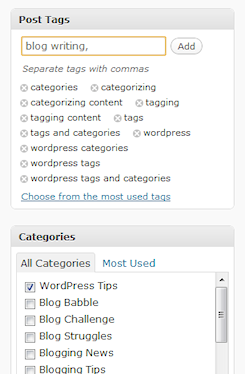 Tags can be features easily from within WordPress as a tag cloud or post meta data on your single blog posts. You can create custom tag and category pages or let WordPress do it for you automatically, displaying all the posts within a specific tag or category.
To confuse things even more, WordPress treats categories like tags. After all, they are a tag in the truest sense of the word. If you click on a category, you are taken to a tag page which displays the posts within that category, just like tags.
You can easily create feeds from tags and categories, giving people access to only the information they are interested in from your WordPress blog.
The key difference for WordPress users is that we have a choice when it comes to overall navigation. We can choose to represent our content by categories alone, tags alone, or a combination of the two.
For more information on how to use tags and categories in WordPress, see Tags and Tagging in WordPress.
Tags or Categories: Which One to Use?
Which should you use and which is better? In this excellent explanation of the difference between categories and tags and why he likes categories better than tags, Owen Winkler explained:
Maybe it’s a trivial thing, but to me it’s important. I don’t want a heat map of tags on my site, or if I did, I wouldn’t want it exclusively in place of a category listing. You could make the same argument on search engines versus directories. Search engines are going to uncover every minute detail with no human filtering and possibly no common thread between the results. Directories will return only human-filtered results, but might not contain every site in their listings.
Tagging gives you topical search capabilities for your site that are a middle ground between categories and all-out search, but it shouldn’t replace categories entirely.
I think of the two a little differently, which is why I offer both categories and tags on my main site and here on Lorelle on WordPress. For me, it’s about:
How can I best help a visitor navigate around my site.
Sure, I want the highest page ranking I can get, but it’s critical that visitors be able to move around my site to find the information they are looking for. On my main site, I have over two thousand articles on travel, nature, nature photography, travel photography, and related subjects. Finding information is a challenge. So I’ve set up categories and subcategories to help people find related subjects, but I’ve also added tags to help people find micro-related subjects.
It all boils down to categories are your table of contents and tags are your index words. By serving up both, you help the visitor navigate your site easily, and help them find the answers they need from your site.
Should tags replace categories? Absolutely not – and it depends. This is an evolving and fast changing technology, one that even caught Technorati by surprise. I expect a lot of changes in how tags work, including search engines getting into the fray, very soon.
Tags shouldn’t replace categories, but they can help the user and search engines and directories find and catalog related information on your site, which is a very exciting improvement in website development.
Related Articles
- Categories versus Tags: Defining the Limitations
- The Problems With Tags and Tagging
- Tags Are Not Categories – Got It?
- Putting Some Thought Into Blog Categories and Tags
- Keywords Versus Tags
- Tags and Tagging in WordPress
- Are You Abusing and Misusing Tags?
Site Search Tags: tags, tagging, tag, category, categories, wordpress, difference, what+is+a+tag, difference+between+tags+and+categories, tags+and+categories, tagging+post, technorati, wordpressdotcom, wordpresscom, tag+plugin, search+engine, tag+service, social+bookmarks, social+bookmarking, bookmarking
Copyright Lorelle VanFossen, member of the 9Rules Network




















 Lorelle on WordPress
137 Comments
I have posted on this subject back in January. Indeed, categories are broader in scope compared to tags.
Hey there… I just wrote a (colossal) post concerning the merits of tags versus that of categories. I did reference this entry in my post. It was very helpful. Thanks! I thought you might be interested in reading the post:
http://sambot.com/2005/11/categories-are-dead-long-live-tag.html
Anyway, thanks for an exceptionally well-written and informative blog!
Blog on!
What an excellent read! Thank you very very much! 😀
Thank you all the work you must do for this blog. I am finding it very helpful and so far I have found answers to all my questions about blogging with wordpress.com.
Glad to help! If you have any specific questions, please let me know.
Hi Lorelle,
I used to live very unaware of what tags where before I found out about Ultimate Tag Warrior and installed it, that’s when I found out I had no clue what tags where for. Then I read…
Now my “problem” is what to do with my categories that I used as tags. I really want to reduce some of the categories I have but I would like to know your opinion since deleting categories can bring me some 404’s (not sure if it’s really gonna be that bad since my blog isn’t really big)…
What I’ve done so far is to create a 404 page with instructions to use the archive page.
Other steps in the right direction would be to tag every post I have and then change my categories.
Do you recommend anything else?
Don’t stress on this. It’s actually fairly easy and only a little complicated if you are using Permalinks. If you want to get rid of the “too many categories” to streamline your category list, you have a few choices.
You can just delete the categories, which would then “uncategorize” any posts without secondary categories, and you will have to re-categorize them into a more appropriate category. This can be a bit time consuming as it’s a manual effort, but if you don’t have many posts, then it’s a chance to revisit your work and maybe fix a few other things along the way. 😉
If you are using Permalinks, make a note of all the links to the various categories. Then in your .htaccess file on your host server root directory, create redirect commands to direct the old category links to new tag links, such as blah.com/tag/tagname and that will display a tag page listing all the posts within that tag, like a search result.
If you are not using permalinks, then you will need to change your redirects from /index.php?cat=5 to /index.php?s=tagname to create a “tag” keyword search result. Or you can use the tag link described above, depending upon how you set your tags in UTW.
Make sure you add the categories you remove to your tag list if you still want those words in your tag list, tag cloud, or tag heat map.
Those are the simplest of choices. And good for you for understanding the difference between categories and tags. It’s a big difference, isn’t it.
Yes, specially understanding that tags aren’t a substitute for categories is really important.
I do use permalinks so I’ll be writing some htaccess rules then.
Thanks for your response
Hi there,
thank you very much for your report. One question. In the hosted version of wordpress.com i can not add tags to a blog post. I can only add categories. Id like to use categories for some navigation things and for users which are not so internet profs and do not know what tags are. But i also want to use “tags”.
In your report you write that the owners of an “full version” of wordpress can add tags to post. Is wordpress.com not hosting the “full version” for me? Is there a way to enable this? Or do you now a hosting (maybe for free) where i can use the “full version”?
thank you very much
Sebastian
WordPress.com blogs are not the full version. The full version of WordPress is available to those who have web hosting (usually paid) and it allows access to the template files which create the look of the website through the WordPress Theme, ability to customize anything and everything, and full access to a wide variety of WordPress Plugins.
WordPress.com blogs are for those focused on blogging not tweaking their blog, though for a small fee you can pay for the ability to customize your WordPress Theme and get a few other benefits. You cannot customize your blog other than through the use of WordPress sidebar accessories known as Widgets and by changing WordPress Themes.
If you would like to add tags, the micro-categorization of your blog posts, I recommend you use the Site Search Tags in A Technorati Tag Bookmarklet for WordPress and WordPress.com Users, the only way I’ve found to add tags to your WordPress.com blog.
Many also use this technique on their full version WordPress blogs as this technique is so easy to use.
I use WordPress to power several of my business models. Wish I could do more with it.
Thanks.
Steve Skooz
Finally have my categories the way I want and now tags come out. Also you can’t have parent and child tags so it’s not that useful unless a topic can exist in a category and be tagged as well.
I’m confused about your understanding of how tags and categories work. You can have the same word or phrase as a tag and a category. Tags do not have parent/child relationships because they never have and there is no need. They are your blog’s index words. Categories are your table of contents, thus, they are by default hierarchical.
tags can be categories but categories are not tags
Nope. As explained, especially in Tags and Tagging in WordPress, a tag is any link with
rel="tag"in the link anchor attribute. All WordPress blogs have the tag attribute in their category links.Does that make categories tags? Absolutely. Does it help us understand the difference between a category and a tag? Definitely not.
For semantics though, categories are your blog’s table of contents and tags are its index words – the keywords that describe that individual post, connecting with other posts with that keyword in the post content. But categories are tags, in the HTML definition of the word.
I see this is a few years old but this post is so helpful. Thank you for sharing such great information! Off to “retag” my site!
Hello Lorelle,
Thanks for the incredibly helpful post.
Just as a point of clarification, will using tags also help my WP search function? I’m not currently using tags and when I use the search form on my blog it sometimes returns iffy results.
@ Jazmin:
Tags have nothing to do with search. Everyone gets iffy results with the current WordPress search and we’re still waiting for improvements in that area.
The only benefit tags have is the adding of keywords to your blog posts, but if you are using the keywords in the post, that’s the same thing, so why bother?
Got it! Thanks so much for the advice (and quick reply!), Lorelle 🙂
Thanks for this info – I really like the comparison of Categories = table of contents, Tags = index words.
How come when I search sites like Technorati, my blog doesn’t appear anywhere near the top, but others who quote me or link to me, do appear near top? Is that tag/category related?
@ creeping:
Each site has their own algorithm, mathematical formula to estimate where a site ranks. Some make sense, some don’t. Some I think I will never understand. 😀
For the most part, it is keyword related (how many relevant and associated search terms/tag/keywords within the content – the post MUST be talking about what you are searching for) and incoming link based (the more who link to the post, the more likely it has the information). From there, it’s anyone’s guess.
As long as readers are finding you and the people who need to find you find you, then who cares what some ranking service says.
Thanks L – presumed that a blog “name” would take preference over tags in the search algorithms but clearly that’s not the case
@ creeping:
Tags do not figure into Google’s search algorithm, other than as keywords. Google does not currently recognize tags. They are just more words on the site.
This is a splendid piece of writing that has survived the test of time! And it still addresses my queries as a newbie blogger. Thanks for this.
I still have one question. If Categories are not Tags and Tags can be Categories, and given that over the years, all possible English phrases and words have been captured by Technorati (in all unrelated context and usage), my question now is: Why even bother creating the Category in blogs?
The wordpress environment confuses it further for me by lumping tags together with categories in the Manage/Categories area. The only value I see with this is for the SEO effect on the Permalinks (which is quickly negated when you indicate two or more categories on a blog post). And this would be too technical and bothersome to the average social blogger.
I wonder if it is time to retire “the Category” and instead allow the blogger to assign ONE Permalink Tag amongst all her 48 other Tags indicated on her blog post..
@ Paul:
Categories are tags. Tags are not categories – though they contain categorized information. At least, that is how it used to be. Tags are per post categories which are specific ONLY to that post but should reflect the overall subject matter of the whole blog but might not. Categories are the table of contents, the guide to direct visitors to related content. Think of them as “Parents” and the tags as “children”.
You do not have to tag your content with category names. I know this is confusing, and it might melt at some time, but think of it as Table of Contents and Index words. If they will work in a book, they will work on a blog, which is a kind of modern book.
Very helpful read, I really wanted to know what the hell tags were all about, and you’ve explained it beautifully!
Why people can’t use the correct term and call them keywords is anyone’s guess… After all that’s what they are!
Thanks!
WordPress Error: Category insert to DB when posting…
I have a WordPress blog on a domain. When we make a post, we would like for the categories to be inserted into the wp_post table within the database. Their seems to be an error because every post has defaulted by category to 0.
I have tested this on many different domains and the classic view to see if it was a template issue.
Does anyone know how to program the posts so that they start importing into the database?
If I could get this to work then I could start listing other articles throughout the site pertaining to a particular category.
@ Kight:
These types of issues are best addressed in the WordPress Support Forum. Interaction with the database are at the core based upon the template tags and functions within the WordPress Theme, so there is a Theme base to the issue.
I don’t understand why you need to have the categories in that particular table when you can pull them from the table they are in the database already. Maybe I’m not understanding your issue, but they can help you there. Good luck.
Understood, I will give them another go…
Basically what I am trying to do is pull 2 different lists of blog posts on my home page. Both columns will pull 2 different categories by SQL statement.
Is their an easier way?
@ Kight:
That has nothing to do with forcing additional categories into your database tables. Why not use a double WordPress Loop with conditional tags – or just the conditional tags? Many people customize the content on their blog from multiple categories, on the front page and in the sidebar. The sidebar content requires a second pass through the WordPress Loop or use a WordPress Plugin like Customizable Post Listings WordPress Plugin which is invaluable for what you want to do, to my understanding.
Nice article. But what are best practices with Tags – maximum number to use per post, single words, maximum to display in a cloud etc?
The key is to use words people use to search. If they search for “WordPress Themes” use that. If they search for “WordPress Magazine Themes” then use that, if you are writing about that subject. If you are writing about “how to make a WordPress Theme for a magazine style site” and people will search for that, then use that. There are no rules. Use search keywords, terms, and phrases. As for clouds, shorter is better. That’s a design issue, not an SEO issue. You decide which you would rather have. Many designers are either putting tag clouds up as replacement navigation for categories, or burying the tag cloud clutter in their blog footers. The importance of tags is changing and categories are coming back strong into blog fashions.
Thanks for your post, I was just searching a way to understand the difference between tags and categories. 😀
Hey Lorelle,
I have a question. I’m using All-in-one SEO pack but I have had Simple Tags installed for a while. I noticed that Google has indexed a bunch of my http://www.example.com/tag/ pages so now in Google, sometimes I see what I’m searching for as a /tag/ page and am taken to a page that shows the “posts containing the tags”… I’ve had to manually redirect over 40 /tags/ page to specific posts or the homepage… Is this normal? (for WordPress to spit out /tag/ pages for every tag and is it normal or OK for Google to index these pages?)
Finally, should I just disable Simple Tags and only use SEO pack for tagging?
I don’t want to create clutter and more importantly have users taken to an ugly landing page (aka all the /tag/ pages) instead of the content and articles themselves?
Thanks a lot, great blog!
Honestly, I’d keep simple tags and get rid of the SEO stuff. It’s the ugly landing page and duplicated content that is troublesome. Tags serve a purpose but content is always better.
Thanks for your reply, Lorelle.
I ask because when I do a Google search for “i work 09 virus” I get the 1st placement in over 660,000 webpages. Now, I feel this is because I’ve entered the tag “i work 09 virus” in SEO Pack… I could be mistaken but my “post titles” on Google are the same as the titles in SEO pack.
I write about 1-2 articles a day on technology and my goal is for Google search users to be able to find my articles by entering the keywords in search, of course, I’d love for my results to be at the top.
From what I understand data entered in the SEO pack fields (under each post) is the META title, description and keywords… I’m not sure if Simple Tags deals with the META but for now it’s just a little confusing…
Appreciate your clarification…
This was the first article I read about tags, I am fairly new to WordPress and I’m getting my education where ever I can get it. Thanks…
Categories are definitely broader then tags. What I’m still trying to figure out is how tags play into SEO. With All in One SEO pack for wordpress you then get to add all of your keywords for the post. Are those keywords the same as the tags?
I still honestly don’t see the value in having both tags and categories. I’d like to be able to have one or the other that accomplishes both site organization and grouping, and search engine registration.
Then have one or the other, whichever serves your readers.
Many only want a table of contents (categories) in their main navigation, but they want micro-navigation links (tags) to help people find related content on individual blog posts. It’s your blog. Do what you want.
After a year of blogging I am in the middle of redesigning my blog structure. Currently, I stayed with only a few categories mostly to fullfil the needs of third-party processing (e.g. aggregation or filtering of “private” posts).
Your post offers a good explaination of what can be achieved with categories and tags. At least in theory. I will definetely use tags in future – and will restructure my categories 😉
Cheers
Very helpful; thank you!
I was coming to this conclusion that you wrote above: “For semantics though, categories are your blog’s table of contents and tags are its index words – the keywords that describe that individual post, connecting with other posts with that keyword in the post content.”
and with that confirmation I can categorize and tag with confidence.
Much appreciation.
Vicktorya
Thanks so much for sharing this. It really helps!
Nice. I was not using tags on my blog till today, but now after reading this post I’m going to add some tags in all my posts. Thanks for the great info.
Thank you Lorelle! I have been wondering this for a while and have asked several of my freinds who are further along on the technical and optimization side of things than I am, but no one could give me a clear, satisfying explanation. Your post works for me here!
I am most definately going to link to this post on my site. Would you mind also if I posted some of this imformation on my site as well if I quoted you directly?
Thank you!
-Alex
Great Blog for newbies like me… easy to understand, well structured and idiot proof! Thank you so much!
gabby
Thanks for the tip! I used to wonder about it.
Hey Lorelle thanks a lot for this. I have been blogging for 2 years now and finally understood the use of tags. I have always used categories for my posts on sinanbastas.com, but never attempted for any tags. Maybe I will try a few now.
Thanks again.
Hello,
Could you answer or point me to where help with this mess I’m in!
When I switched from version 3.3.3 to version 2.9, I ran into this situation with the (category to tag converter)the ‘convert button is not showing.
‘Tag to Category’ does show the convert button.
All else functions properly.
Convert Categories (608) to Tags missing the the Convert button due to this error.
Fatal error: Allowed memory size of 33554432 bytes exhausted [edited]
Have absolutely no idea where to start.
How can this be corrected!
Assist appreciated
ok
I’m new to all this. I’m trying to learn what to do with tags. But everything I read so far – including this article- don’t really help someone not well versed in techspeak. What I need is a cookbook recipe style, it to post a tag:
1.Do this
2.Do that
3.Then do this
4.Then do that
You don’t have to do anything with tags. Tags are no longer valid, other than for micro-indexing/categorizing your own content. There was not wide-spread adoption of tags, so they are kinda of useless now. They can help with navigation, but that’s all. So stick with solid categories for your table of contents navigation, and if you want to use a tag cloud to encourage more intrasite navigation, go ahead. For more on the how to, see the related links and Tags and Tagging in WordPress.
Excellent article. Thanks. I’m just creating my first WordPress blog and it’s all very new to me. I used the search phrase – tags vs categories wordpress – on Google and your entry came out first.
Good tips Lorelle!
Just to illustrate what you were talking about tagging, in our website we use this machine in the first way related by your text. To tag a specific term.
Hugs
Thank you – very clear – I intend to read more on you site – Stephen
Thanks! That was really helpful!!
thanks for clearing that up!
I am changing up a few things on my bog this AM. Thanks for this post as it cleared up on aspect in this adventure for me.
Thank-you for the very clear explanation of the differences. As a new WP blogger, I was a bit confused about the differences between categories and tags. I now have a much better understanding.
Good point in comment #20 Lorelle. Cramming all your keywords into Tags is like visual pollution. Stop the madness.
I have some doubts when use Categories, Tags or Post types. I’m studying about themes for a theme system specially for animals adoptions and decided (until now) this structure:
For adoption
dogs
cats
Already Adopted
dogs
cats
News,
Articles etc (some more categories)
So when a dog is adopted, I change the post to ‘adopted’ and ‘dog’ category, is that right?!
I using Custom-taxonomies for: size, color, etc
Read somewhere is not good to set 2 categories in posts (e.g: adopted/dogs), is that true?!
Post-types seems nice, but don´t know if has some use here.
Thanks for any help!
WordPress.com blog Themes do not permit a lot of customization for these specific needs. If you wish to use categories to change the status of the category, that would work. I believe there are WordPress Plugins and Themes that deal with similar situations. You might want to do some searching for those.
Great article. I’ve one question. Would you suggest each single post be put into just one category or a single post can be put into more categories? which is preferred?
Thank you very much
A category can have many posts. If a post fits into two categories, put them in there. There are no preferences. It’s your blog. The goal is to help your readers find content and answers, not confuse them, so use them appropriately.
Thanks Lorelle
I had been wading through a WordPress textbook I bought and the penny still hadn’t dropped about when to use categories and when to use tags.
This is really clear advice – now I get it 🙂
Also, despite search engines generally not recognising tags today, it doesn’t mean that they won’t place some emphasis on them in the future.
Armed with your advice I’ll start using tags in part as an investment for the future in case this happens.
The question in my mind is that if we have both or one it should be dofollow or nofollow.
I mean is it good to restrict search engines from indexing the tags and lets the readers see it so that they can navigate the blog content.
There is no dofollow or nofollow – and trust me, there never was a dofollow. It was a link without a nofollow. Nofollow is still not supported universally and research and proven repeatedly that nofollow also doesn’t work consistently with Google. We need something stronger, but beating these dead horses isn’t it.
I have been wondering what the difference was. Thanks for clearing that up for me.
igot a lot of 404 errors because tags are seen as categories. if i use redirect then should be ok but the problem is that directs also the original categories into tags. i am a bit puzzled. anyone had the same issue? cheers.
Have you asked in the WordPress Support Forums? They would have the specific answer. Categories are now tags in the latest versions of WordPress. This is part of the confusion when it comes to redirects. The issue, however, is why you are having trouble with tag redirects. Did you change your URL system or move the site? Otherwise, it should work fine.
@LVF Nope, did not move site but after importing a blogspot blog to wordpress website all tag were seen as categories. i used category to tag convertor and was ok but google seemed to keep in mind that initially all those (now) tags were imported as cat. This is the reason why used the 410 plugin to kick google’s mind. and it worked:) errors removed. cheers.
All designers understand the differences in 2011. But in 2005…
Good to know 🙂 and hey….i wanne say thanks for the usefull knowledge.I just love it!.lol
solved problem with tag-> categories confusion by google. A 410 wordpress removed plugin did the job. Now google errors went down.
Great post!!! Also a neophyte to blogging and WordPress, this was extremely helpful to me. Thanks!!
why would be necessary to use tags if involving the specific keywords in the content (post body). Is it any difference?
If I understand your question, it is not necessary to have tagged links for any reasons other than for increased navigation, whether in the content or on the site. If you have a list of tags, say, at the bottom of the post, it encourages people to click through to related content. They are not necessary, but it’s important to understand how to use them if you do.
A conflict between the slugs used (for categories, tags, etc.) is not a rare issue for WordPress blogs, especially for those blogs which have so many posts.
Lorelle, do you have any suggestions in order to prevent such issue to happen too frequently?
I’m thinking to use these rule of thumb:
– name categories to at least three words
– name tags to maximum two words
What do you think?
I think that’s ridiculous. Three word categories are…terrible. One to two is typical. What, add a “the” to them? That’s dumb. I’m not sure what issues you are having. I use the same words for tags as well as categories and vise versa. I have no problems with any of them across multiple blogs with thousands and thousands of tags and hundreds of categories. What issue are you having?
1. Categories, if used correctly, should be featured as your table of contents.
2. Tags, if used correctly, are your index words, and used accordingly in clouds or lists in the post meta data.
3. Both are navigational features, one macro, one micro.
4. To generate tags and categories, you use different template tags.
5. They are all taxonomies, so you structure them as you need them, to meet the needs of your readers and their interests, and trust me, readers don’t care if they are tags or categories as long as they let them know what are your key content topics and how to get to the information they want and need. From there, it’s all search, so who cares what category or tag they are in.
Doe that help?
Thank you so much for this informative article. I am still in the foothills on my climb up this steep learning curve…this helped a lot to define the differences in tags and categories. I have referenced this article in my own article identifying the challenge of learning the difference and how to use each effectively. Thank you so much!
Deer
I am still not clear when should a word or phrase be called category and when it should be called tag.
If the word used represents a body of work, and what you want to specifically blog about, it’s a category. If it is a descriptive term that represents the specific post you are writing, it’s a tag.
I am pretty clear on Categories after reading your article and thus I have cleaned up some extra categories such as “Success” or “Winning” because they were too ambigious and all my posts qualify for it. I also removed category “Health” because I may not write many posts about it.
However, purpose of tags is still unclear to me. For example, one of my post about “Outliers” book, has tags “Outliers”, “Malcolm Gladwell”, “10000 hour rule” etc. which may not be used in any other posts. Do these phrases qualify to be tags? These words will never show up in my tag cloud because they have just one post. I feel (I may be wrong) that tags such as “Communication” and “Delegation” for posts on category “Project Management” qualify for tags because they will be used later and give specific purpose of a particular post. I plan to get rid of “Success” as one of the tag (Success shows the top tag in tag cloud).
Please advise.
Think of these as index words. While they might not show up in your tag cloud, they are on the post. If you publish another post with any of those keywords, you will help people find more about the subject. If you never will, then don’t use those as tag words. It serves little more than navigational help today to use tags.
Hi Lorelle
After reading through your excellent post, the fog is not as thick for me around categories and tags, but I do have 2 questions that I’d like some clarification on.
1. My blog now comprises mostly movie reviews, but in the early years I posted a lot on a range of other topics that I have arranged into categories…I think appropriately. I seem to be treated well by Google, generally speaking. When I do reviews, I don’t usually add many tags, but after reading your blog I am wondering whether those I add are worthwhile. Best illustrated through example. Say I’m reviewing the movie ‘The Tree Of Life’. I’d typically add the following tags: ‘The Tree Of Life’ movie review, Review of ‘The Tree Of Life’ movie, ‘The Tree Of Life’ critique. If I commented on the director in my review, I might add some related tags: Terrence Malick director ‘The Tree Of Life’, criticism of Terence Malick director ‘The Tree Of Life’, Terence Malick audacious vision ‘The Tree Of Life’, and so on. The reason I add tags with the same meaning but using different syntax or phrasing is to try to cover the sorts of searches readers likely to be interested in my reviews might type into Google. Am I using tags in an appropriate way? Or are my attempts to anticipate the wording of searches by prospective readers a waste of time? I do seem to rate very well with Google with my reviews, often appearing high up on the first page in response to the types of tag wording I use – or maybe the tags have little to do with it? Would be interested in your comments.
2. My current theme by default does not show the tags for each post anywhere that is publicly visible. I want to change this theme soon, probably for a customised version of the Twenty Eleven theme (which I am currently working on). The Twenty Eleven theme does by default show tags after each post. I used some CSS suggested on the WP Support forum to render them invisible, but fear I have actually gotten rid of them altogether. You can see from 1 above how I’m using (or perhaps misusing?!) tags, so would you say I should get rid of the CSS that hides (or deletes) the tags, OR do you think they’re still there anyway but just hidden, OR do you think it doesn’t matter either way?
I can imagine these are very dumb queries, and if so I apologise in advance. Hopefully, your response will assist my understanding further.
Fantastic blog, BTW. I’ve come across it many times over the years, but this is my first comment. That speaks to the clarity of your writing.
Cheers!
Ross
Wow! You tag in complete thoughts. How about “movie review” or “movie”? 😀 Forget Google. Sheesh. Think of your visitors first. If they are looking for Terrence Malick wouldn’t they look for Malick? Not “Terrance Malick director” with the movie name. You can do that, but your tag cloud must look a mess. One to three words TOPS.
If you are using a WordPress Theme that doesn’t show tags, you can add the tag template tag (love saying that) to your Theme, or you can switch Themes. Why would you want tags invisible? That’s their purpose and poor thinking on your part, sorry to say. If I’m reading a review and I want to see more by that author or with a specific actor, I could click the tag for their name and find more information you’ve written about them. That’s helpful, right? Invisible is spam, gray hat stuff. Tags are micro navigation. Quit thinking of them as only SEO link bait.
Put your readers before search engines, always. That’s how you keep them coming back and sharing their love for your site around the web. If you write well in your reviews, trust me, you’ll turn up in search engine results, tags or no tags.
Hi Lorelle
Thanks for your prompt response.
Well, I guess I’m gratified a little by your response. I am turning up high in the listings, people are finding my reviews, I’ve had two directors post positive comments about a movie of theirs I reviewed, and have had excerpts from my reviews quoted on cinema sites. So, if my current theme is not showing any visible tags, my writing must be speaking for itself! Not loudly enough, though – I average only 140 or so hits per day, and have just 65 subscribers! So, some way to go yet to claim I have a successful blog…
Look, to be honest, I’m confused. I’m really NOT ‘putting Google first”. The questions I posted are a reflection of my paucity of knowledge in the tech area, and if it comes across that I’m thinking search engine rather than readers, I can only say I have somehow misrepresented myself to be interpreted thus. I am no geek wannabe. I am a writer, a copy-editor, an editor – I depend on these skillsets for my income, such as it is. This has been the case for over 20 years now. So, readers HAVE to be my first priority, and they are! However, to the best of my understanding, online readers who are not aware of your work can only find you, or mostly find you, via Google. Therefore, if you don’t pay some attention to ensuring you turn up on the first 1-3 pages, and preferably the first, when punters type something into Google relevant to your post(s), you’re sorta defeating the purpose of posting articles on the web! No readership, pointless blog. Not picked up by Google, no readers. It’s a vicious circle, right?
I am aware of the sorts of shady practices that are sometimes employed in the cause of SEO – invisible text etc – but my question about making tags invisible while retaining them for search engines to access speaks to aesthetic considerations on my part, not sneaky SEO strategising. I just prefer an uncluttered look for my blog. Further, I never click on tags myself when browsing other folks’ blogs. Until now, I never understood their purpose, except to assist search engines to identify topics readers are searching for. I didn’t realise that tags had a useful function for readers as well as search engines! So ta for the alert on this!
With my current theme, there is a facility for typing in tags (in the same place you type up your posts), which I have been doing. However, the tags do not appear on my blog itself. I glean from your comments that these tags are therefore not performing any function whatever (apart from fooling me into thinking I was doing something useful for readers searching for reviews of the movie I am reviewing). Is this correct? Or could these tags be showing up to the search engines even though they are not visible on my blog posts?
The reason I write my tags as I do is that I’ve noticed when using Sitemeter to check out the search wording of people who land on my blog that they’ll often write things like “Review of ‘Tree of Life’ movie”. Or ” ‘Tree of Life’ critique”. I thought that in wording my tags similarly, my review post would be more likely to come up in response to a searcher typing in the same thing. Am in incorrect in this? If so, I really have no understanding of tags and how they function, even after reading your post. That’s depressing, reflecting on me, not you.
It doesn’t make sense to me to word a tag as simply as “movie review” or “movie” – wouldn’t this just bring up literally thousands of movies unrelated to the one I’m reviewing, or movie reviews of all sorts of movies? If so, how is this going to assist readers to find my review of a particular movie? If not, could you pls explain briefly? Just seeking to understand…as you see, I am still not getting it.
Thanks a lot for your help and for sharing your knowledge.
Cheers
Ross
Let’s see if I can take these fast and simple.
1. If the right people are finding your site, you win, no matter what you are doing. Personally, if one person gets something from my blog once a day, I consider that a success. If you make 65 subscribers happy, I’d consider that a resounding success in my humble definition.
2. If you are putting your readers first, then you are on the right track. Ask them what you should do to improve your site.
3. Let analytics (not just Sitemeter) really tell you want is going on. Do tests, make changes, test again, and make decisions based upon the results. Don’t trust your behavior to dictate design decisions. We all do this differently. Trust the numbers to a point.
4. Tags are debated about their benefit to SEO. In order of priority, Blog name, URL/link words, post title, headings, content, categories, and somewhere at the bottom are tags, if properly labeled. If you get the first ones right, tags don’t matter, except as another method of navigation.
5. Hiding tags with CSS is black hat SEO. Either don’t use them or use them, but don’t hide them. If people find out, it won’t be good for your reputation if they interpret it wrong.
6. Categories are table of contents, tags are index words. Don’t think of them as search terms. They are index words. Navigational tools to help people find stuff. Nothing more.
7. What is really hurting your site is not having permalinks turned on (that’s the credit you get for URL/link words), and having it under the WordPress subdirectory. It’s like burying it under a rock. Get it into the root directory. Having WordPress in your domain name could mean that people will arrive searching for WordPress help or keywords, which dilutes your search engine position and keyword relevance.
There is a lot you could do with your site beyond tags and fixing those issues to make it more relevant and to make yourself an EXPERT not just a personal blogger. Right now, it looks personal, so if you want to do more, beef it up. I recommend you read my series on Selling Your Blog: What Are Blog Buyers Looking For? | The Blog Herald and the follow up articles. And check out fellow Aussie, Darren Rowse of Problogger.net.
Thanks a lot, Lorelle.
Plenty to ponder on and panic about there! Looking at your comments, I realise I have been very negligent in ignoring the tech stuff. I guess I assumed all that was needed to have a successful, well-functioning blog was create a WP blog and work on ensuring the content was good quality. Very naive and wishful in my thinking, I see!
I’ve changed my permalinks from the default setting to something I saw recommended on Codex (/%year%/%category%/%postname%/) – or maybe I got it from another blog on WP Permalinks. Whatever, my web host support informed me that there was an old file preventing the permalinks from working, which they deleted – so, hopefully I’ve now properly actioned that recommendation of yours. THANK YOU!
Before I follow through on your root directory advice, would you mind giving me some brief thoughts on whether there would be any significant advantages to my having my blog hosted on its own domain, rather than as a subdomain of my perthpunk site?
I’ll leave you in peace after this, and get on to reading your ‘Selling Your Blog’ series and the other related sites you’ve linked to. Very grateful to you for waking me up. I’ve had my blog going for years, but have probably wasted a lot of time with it being so far from optimised when with some focused research and effort I could have been building a bigger readership and better serving my readers, as well as getting far better value out of all the blood sweat and tears I’ve invested in writing posts.
Cheers
Ross
You haven’t wasted time. It’s all a learning lesson. That’s what this blog is about, helping people learn and relearn from all angles. 😀
I can’t really answer the question as to domain or subweb (that’s what you are really creating with the example.com/wordpress – a subdomain is wordpress.example.com – just for clarification of the proper terminology) as I don’t know how it would fit into your main site. reviews.perthpunk.com would be smarter than the one you’ve chosen if you choose to go with a subdomain that’s relevant. Or maybe it might fit within the whole. Only you can decide that.
The rest…eventually you would have figured it out. I used your example last night at a WordPress Meetup and came up with the perfect example of a recipe book. When hunting through a recipe book, you search mainly for only two things, the type of meal such as appetizers, entrees, or deserts, or the country of origin (I’m in the mood for Italian tonight). That’s your table of contents. The third search is a search for ingredients, basically what you have in the fridge (hmm, what can I do with that eggplant that starting to mold). Those are your tags, the index words.
Good luck with your project and keep on blogging. It’s always a joy to meet people who have been doing this for a while and have such vested interest in improving.
Nice positive spin on my slackness, Lorelle! I’ll take that. 🙂
Very clear analogy with the recipe book. Think I’m starting to get it with tags, but still not sure that will translate into good practice (which indicates that I have a way to go). We shall see…
Re my subweb vs own blog domain question, there really is no thematic connection between perthpunk and my Boomtown Rap blog. The only reason I made my blog a subweb of my punk history site was to save money on hosting and domain name registration costs. As time has gone on, the blog has become the focus – overwhelmingly so. If I’d suspected that would be the case when I began blogging, I would have given my blog its own domain from the start.
Just thought I should clarify the situation. You were attributing me with more foresight and organisational orientation than was ever the case, sadly!
Thanks again for sharing your wisdom and experience.
Ross
I’m glad I’m helping. If you have enough “space” on your site, you can have two separate domain names pointing to the same. A bit of code on the server and it works like a charm. I have several on one server and…lost count of the dozen or more on another web host. It’s actually easier than you think, which would separate the two much more cleanly, if you choose to go that route. Either way, give up the “wordpress” in the domain name and make it reviews, rants, opinions, or BS. 😀
You’re doing great things, just keep on trucking!
Ta for your engouraging comments, Lorelle.
I wasn’t intending to bother you again so soon, but since I changed the Permalinks from default to custom I’ve lost almost all my blog traffic! I’m not sure of the technicals behind this, but obviously it’s not coincidence. Is there something I can do to remedy this situation – and fast!? A redirect thingo of some sort, or whatever?
I do know that my host support removed an old system .htaccess file in the wordpress directory which they said was stopping permalinks from working once I’d switched to the custom option. Does this mean that my traffic went with that removed file?
Cheers
Ross
Removing the .htaccess file was rather drastic. Without a backup, no clue what was in it. If there were redirects, problems could happen with visitors, but honestly, this should have done nothing. Blog traffic shifts in weeks not hours. Have you tested the links? If everything is working from the front page throughout the site, this isn’t the issue. WordPress easily handles links to /index.php?p=205 to the properly named URL automatically. Something else might be going on. Them deleting the .htaccess file wasn’t necessary. Removing the bit in the file that kept the permalinks from working was all that was needed. Very odd stuff there.
Either way, it is better to have proper “pretty” permalinks than not, so check to see if they did something else. While you are at it, make sure they have the latest PHP and MySQL versions to be compatible with the most recent version and upcoming versions of WordPress, and keep the site updated. There have been some serious security issues lately and you want the latest version of WordPress installed.
Actually, I might have a backup. I upgraded to the latest WP only a week or two ago and did a backup then (using the backup facility within WP). I wonder if this would have included the .htaccess file?
I will follow up on checking to see if they did something else, and also ask whether they have the latest PHP and MySQL versions. Thanks for your feedback, Lorelle. As interesting and useful as always.
Cheers
Ross
Lorelle, thanks for your article. I did a search for additional clarification about “tags” versus “categories” on WordPress.com blogs. What I got most from your post was that ultimately, the blog is for the reader and about how best to organize content for the reader to find what they’re searching. Thanks again!
You are exactly on track with that discovery! Well done, and thanks for the kind words.
Thanks for the information in this post. VERY helpful. So if understand this correctly, my categories should be more general (although on topic) and my tags can be a bit more specific and even off topic some, as long as it helps my visitors navigate easily through my site…am I right?
I will probably think of more questions later 😉
You are right. Again, think categories are your table of contents and tags are your index words. Tags are micro-navigation links.
Hi, is there any max “categories” on 1 site?
There are no maximums to the number of categories you can have on a site, however, there is also common sense.
Categories are designed to be chapters – table of contents. Tags are index words and there can be thousands of those.
Thank you! I’ve been looking for straightforward info on increasing traffic and making your blog better — and all of it is either too in depth or just basic lists of to-do’s.
This is a great explanation…I figured I was doing the “cats vs. tags” wrong from what I had read, now I have ideas on changing it and making it better.
I can’t wait to read more of what you have…
I am so confused! This is not my “language”! I like you explanation of “categories are your table of contents and tags are your index words”. I believe this needs to be my mantra.
Question – should the tag word appear in the body of the blog? Can it be in the title?
Also should I delete extraneous tags and categories?
I’m always stunned that this is so hard to understand. I think you are confusing tags with keywords.
Tags in WordPress are added on the post in the Post panel under “tags” and are highlighted automatically in the post view of the WordPress Theme. If you wish to use a tag link in your post, that is up to you. Tags are for micro-categorization of your content. Navigation. Honestly, not much more than that.
I’d delete all categories that don’t apply to your focus, ensuring the content in those categories are moved to the right category or the content trashed. It’s up to you. Leave the tags alone as they will not matter going forward.
Is there any way the links with tags to be visible in one language (e.g. Bulgarian) on the web page and to be indexed by search engines in other (e.b. English)?
Search engines index what they find and can see. They use the language that is “visible” to them. So if you wish them to be in two languages, you will have to put them in two languages, manually or find a way to do so automatically. If the content is in Bulgarian, then the tags should be in Bulgarian as you are serving that audience. Trying to game the search engines with English tags helps no one, so I’m not clear on what you are trying to do.
Im glad i stumbled upon this article. I am in the same dilemma now. I am starting to build content on my site and didnt know what method was preferred. Right now my web guy uses tag cloud, but im now sure how effective it is. Could someone tell me what they think about my site.
I no longer do site reviews for free as I get a lot of requests. I’d talk to your “web guy” about his or her understanding of tags and categories. There is no “preferred” method, only what works for you. If your analytics says that the tag cloud works for navigation, and you’ve tested categories and find they don’t work, then stick with tags. If they aren’t working, test and change. Us telling you what we think won’t matter if we have no access to the private analytics of your site, and it takes a lot of work to analyze that information.
I disagree.
To get into a search engine, you used to just have a solid content, structure, and keyword development and manually submit your website to the search engines and then wait for them to come cruising through with their robots and spiders.
The sentence is a bit awkward, but the past tense is correct. See below for true meaning.
At once time, you merely had to have a solid content….
Ah, I love grammar police on blogs. 😀 Thanks for the explanation. I thought I had deleted his comment but I hadn’t. Thanks anyway for jumping in and helping reason to be seen. 😀
I love your explanations. I know so little about web design and blogging that your site is extremely valuable to someone like me. I am so glad I found your site. You explain everything with precision and lucidity.
I do hope you realize I was disagreeing with someone who said you should have used “use” instead of “used”, not disagreeing with what you said originally. My sometime moniker on the net is “grammargrannyguru”. My goal is the reduction of obfuscation. You are a genius in your field. I doff my hat to you and your expertise in all things blogged.
Got it right away. And I love the idea of you being a Grammar Granny Guru. Brilliant!!! Thanks for the kind words and keep up the great grammar police work! We need it.
Lorelle, I am also on WordPress. I plan to get set up as “granny grammar guru” and answer questions writers send me on spelling and style, such as the difference between “mantel” and “mantle,” “nauseous” and “nauseated,” etc. I plan to check it every morning and every evening so I can help people who are stumped or merely confused. I am slow getting started, though, because I have so many projects going on, but I have that as a goal.
Good for you! I saw from your domain name that you were on WordPress.com. Ain’t it too much fun!!! (a little grammar pun for you to help you get motivated.)
Top article. I really think it is important to ensure you tag your WordPress posts as well as to add them to categories. This enables you to add to a nice clean category stream of posts for good initial navigation, but also a reference at a later date via a set of common tags which is particularly helpful for a more niche content search.
Great information. I am trying to understand the use of tags vs. categories and this gave me a good understanding. Now, I wonder if things have changed much since this article was posted. I would think as fast as things change on WWW. Thanks!
Nothing has changed.
An outstanding share! I’ve just forwarded this onto a co-worker who was conducting a little research on this. And he actually bought me breakfast simply because I stumbled upon it for him… lol. So allow me to reword this…. Thanks for the meal!! But yeah, thanks for spending time to discuss this issue here on your web site.
hello, i just wanna ask if you could provide a code that will trim and show only the text beetween theText Here .. also, a code that will show the text which has a beginning of a word ‘Price’
e.g: post text… Price: $23.99…text text…
the output will be, $23.99
thanks in advance, cheers!
I have no idea what you are asking. Please direct your questions to the WordPress Support Forums or a web design support group. Thank you.
Thanks for a wealth of information regarding categories and tags in wordpress. Maybe you can help me further.
Take a website about vintage cars, having the categories “limousines”, “convertibles”, roadsters”, …
1. tags with synonyms “oldtimer”, …
2. tags regarding maintenance: “PaintShop”, “SpareShop”, “ChopShop”
3.. tags regarding trips: “OffRoadTours”, “MountainTours”, …
4.. tags regarding models: “Mercedes SLK”, …
My idea:
a) Creating category pages consisting of 1. category introduction, 2. products / offer, 3. Feeds of the category’s posts, 4. additional resources. Linkbuilding should happen mainly for these pages.
b) Indexing both category and tag pages
My questions:
– Your ideas?
– What about the SEO-effect of the tags, mostly the ones with synonyms for my categories?
– Is Google recognizing the context of “PaintShop” and vintage cars?
Would really be great if you could shed some light on this idea.
Looks good but please put spaces between the tags and category names. No one is going to look for OffRoadTours. They are going to look for Off Road Tours.
I don’t know what category introduction is. If you have to teach people how to use your website, it isn’t designed well. Your Pages should be About, Legal or Policies, Products (which can go to special offers, subPages for specific projects or posts featuring specific products), Subscribe (feeds and subscription options), and Resources (where you can stuff it full of links – linkbuilding is old fashioned and doesn’t work any more unless you put the links within post content – part of the site content talking about why someone would visit a site rather than a list).
I don’t know what indexing category and tag pages means. That’s very archaic thinking. Your list of categories and tags in the sidebar is enough.
If you name the tags and categories appropriately, SEO is done. Forget SEO. It’s another archaic way of thinking. Write with words people search for and be done with the games. PaintShop is a graphics program and has nothing to do with cars. Use words people will search for and paint shop or auto paint or car painting or whatever words they use will get you further than the brand name of graphics software.
You are on the right track.
Thanks Lorelle for your prompt and helpful reply and your useful tips.
Let me try to clarify the open questions. Would be great if you would help me further.
Technically there are 3 parts of the website:
1. company and products (this part is not written in wordpress for various reasons)
2. shop (shop software)
3. blog (wordpress)
I want to establish one hub page (kind of home page) for each product group (e.g. roadster). These pages should be part of the 1st part of the website: company and products. Although I want to use wordpress category pages for this.
Each of these category pages should consist of a) a short introduction what the category is about (e.g. some lines about roadsters), b) the list of products (leading to product pages as outlined by you), c) a list of the most recent blog posts about this category, d) a list of Links to additional resources.
Your idea about this concept?
With “indexing” I mean not blocking by robots.txt. There is some advice around to either index categories or tags but never both. Your experience and ideas?
Regards Jeanette
You have two choices. The method I described, appropriate for a small number of “products,” or ustom Post Types so you can really drill down into the taxonomy of your site. That technique is more appropriate for catalog sites, which is what it sounds like you are really doing. A good xml sitemap will do all the work of indexing you require for search engines.
I don’t know how you think that there is no advice or information on indexing both categories and tags. They are ALL indexed by search engines.
Categories and Tags are very similar to Section and Category in Joomla. Take a newspaper you have separate sections The View, the Calender and than you have categories under each section.
Thank you for the very helpful information. I have had to redesign my website and was getting bogged down and confused. Still confused but have enough info to just go out there and try it. Thanks again.
Im considering making a blog about what I do, which is Joinery, and that that includes building kitchens, box making and woodworking, these, for a quick example are categories with hierarchy:
Woodwork
…………
Now, I look at what I have above and I’m sure if I should do it like this, I plan to have many posts and been told that tags work better for this. I plan to make my blog expandable too, so if I ever find a new topic it’s easy to add in and just start talking about. Any ideas? I’m slightly confused about what to do, seems like such a big decision…
Ah, welcome to my world. I love playing with wood!
The only thing I see in your subcategories is that they aren’t clear to someone landing on Design and not knowing which parent level design you are talking about.
Keep it simple and start with the parent categories. Use the others as tags.
If you really get rocking in a specific area, add it as a parent or be specific with the subcategory such as Cabinet Making Design.
By the way, design and innovation are kind of the same thing. So I’d stick with Plans, Designs, and Tools (we get that machines are also tools), streamlining this down even more.
Hmm it appears like your blog ate my first comment (it was super long) so I guess
I’ll just sum it up what I submitted and say, I’m
thoroughly enjoying your blog. I too am an aspiring blog blogger but I’m still new to everything. Do you have any helpful hints for first-time blog writers? I’d really appreciate it.
This entire site is dedicated to beginner to intermediate bloggers. Enjoy.
Hi! I’m at work surfing around your blog from my new iphone 3gs! Just wanted to say I love reading through your blog and look forward to all your posts! Keep up the excellent work!
What an excellent read! Thank you very very much! 😀
I guess tags and categories are same as its is same in Joomla, If i’m wrong let me know. by the way nice informative on category versus tags
I believe that tags and categories were added to joomla based upon WordPress features. I assume they are the same.
This was so useful, thanks! (Found this site from managewp.com, by the way.)
203 Trackbacks/Pingbacks
[…] Lorelle has a big posting on it. And I’m still confused! […]
[…] Jacob Appelbaum’s blog on Hurricane Katrina is an amazing read, but it also features an interesting use of categories as tags. I’ve talked about the difference between categories and tags, the limitations of using categories as tags, and how to manually add Technorati and search tags to wordpress.com. Jacob’s site pushes the categories as tags feature to the limit, making the categories really work as tags. […]
[…] The article Categories versus Tags – What’s the Difference and Which One? didn’t really help me much. […]
[…] Categories versus Tags – What’s the Difference and Which One? (explains that tags are not a replacement to categories, they are complementary…great, realistic explanation) Adding Technorati Tags to WordPressMU Sites (blog posts pointing to related posts at Technorati tags, and pointing to related posts within your blog) A Tagging Bookmarklet for WordPress and wordpress.com Users (making the bookmarking process easier) […]
[…] Categories versus Tags – What’s the Difference and Which One? (explains that tags are not a replacement to categories, they are complementary…great, realistic explanation) Adding Technorati Tags to WordPressMU Sites (blog posts pointing to related posts at Technorati tags, and pointing to related posts within your blog) A Tagging Bookmarklet for WordPress and wordpress.com Users (making the bookmarking process easier) […]
[…] I have talked a lot about how to put tags on your posts, including how to create a custom bookmarklet to add tags to your wordpress.com or WordPress posts, and the benefits of tagging, as well as the difference between tags and categories, but what I haven’t talked about is the issues involving tagging from the end user point of view. […]
[…] After reading this and this, I think I finally get it. I was initially looking at it from a standpoint of categories or tags. I’d never really considered looking at it from a view of, categories and tags. […]
Using Categories and Tags, Together
Back when tags first started popping up in blogs, I just didn’t really get the point. Instead of putting blog posts into categories called Books, Movies, Life, people were using tags: books, movies, life. I didn’t really see how this was an…
[…] I’m adding a few changes, which most of you probably won’t even notice, to the blog. First off there’ll be tags next to the existing categories (of which the latter have been cleaned up somewhat). The combination of the two sounds like a useful deal. Use a single category to define the global scope of a post and use tags to make it more search and indexable from outside the blog. […]
[…] Categories, Tags, and WordPress Those of you using WordPress, you have the luxury of both worlds, visibly and invisibly. Categories come with WordPress, and you can add as many categories and subcategories as you want to help users find the information they need. WordPress also works with Technorati to ping Technorati and Technorati does use the categories on your WordPress site as tags, which should also make you think twice about using funky category names. In fact, WordPress uses Ping-o-matic to ping a variety of feeds, tags, directories, and search engines automatically when you save your posts. […]
[…] tags (like Technorati tags) […]
[…] Doing, Going, Learning, Planning for the Road, Business of Nature Photography, Photography Techniques, Web Pages, Website Development, Telling, and Israel are categories. WordPress automatically turns categories into tags. Yes, these are topics I blog about, but a few months ago I decided to start this blog, Lorelle on WordPress, to hold all my website development and blogging topics, including WordPress topics. So I can explain to someone that I do blog about website development, blogging and WordPress on one of my blogs. […]
[…] I have long thought of categories as categories and tags as helpful, linkable keywords, leading the user to more information on that specific term or reference. I spelled this out in “Tags Are Not Categories – Got It?”. This was written after I tried to help people understand the differences between tags and categories in “Categories versus Tags – What’s the Difference and Which One?”, “The Problems With Tags and Tagging” and “Categories versus Tags: Defining the Limitations”. Honestly, why do categories have to be tags. Categories can be tags, sure, but not all categories are tags, and not all tags should be categories. I think of categories as a table of contents and tags as the index page of a book. If I’m searching for a broad topic, unsure of exactly what I need to find or the keywords, then I will hit the table of contents (categories). If I know the exact word I need in order to find the information I want, then I will hit the index page (tags). As repositories of content and information, why should blogs be any different? […]
[…] Tags and Categories: Categories are for users. Tags are for tagging services like Technorati. Is that clear? Now, let me confuse things. […]
[…] Categories versus Tags – What’s the Difference and Which One? […]
[…] You can follow any responses to this entry through the RSS 2.0 feed. You can leave a response, or trackback from your own site. Leave aReply […]
[…] Introduction to Tags: https://lorelle.wordpress.com/2005/09/09/categories-versus-tags-whats-the-difference-and-which-one/ […]
[…] Now comes the last task and I was anticipating problems here since I didn’t know anything about tagging. Questions like what is it?, what is it used for?, advantages? seemed tough.. But I began my search to find the information to get started and I found this article. There are quite a few articles on tagging if you want to read about it. From this post and other posts here, I kind of figured out that tagging is one more way of organizing your contents and properly organized contents can make visitor’s life little more easier for sure. I also figured out that there are more concepts around tagging like track backs, ping backs, various tags related sites etc which I will probably cover in a separate post (I too need to refine my concepts a bit more). Coming back to the issue of providing a mechanism of tagging the blog posts which once again wasn’t difficult to answer because Christine Davis has written a plugin called Ultimate Tag Warrior for this very purpose. I went ahead and installed the plugin by simply uploading the Ultimate Tag Warrior in the /wp-content/plugins folder as instructed and also as I knew from my last experience. […]
[…] An excellent discussion of “tags versus categories” can be found here. Lorelle’s blog is a true treasure trove of information. Stop now and go spend an hour there – you will come back with a much better idea of what the hell you want. […]
[…] which would stand their context and meaning even outside this blog. Posts by Carthick Sharma and Lorelle give the best […]
[…] I’m going wrong (although the tag cloud part of it seems to work). Also getting the sense of the difference between tags and categories, which seems to open things up in terms of highlighting themes. I’m still experimenting with […]
[…] Up until now I have been using the default Categories feature of WordPress as tags. Although very similar, there are differences between the two. […]
[…] خوندم دربارهی اینکه برچسب و دسته با هم فرق دارند؛ اینجا یکسری تفاوتهای باحال از نظر به کارگیری هر کدو م […]
[…] Categories versus Tags – What’s the Difference and Which One? (tags: blog tips) […]
[…] cual es la diferencia entre etiqueta y categoría, les recomiendo el artículo escrito por Lorelle: Categories versus Tags – What’s the Difference and Which One?. Básicamente un etiqueta tiende hacer una palabra clave de tu artículo y hacer relaciónes más […]
[…] Category Vs Tags […]
[…] they get into the whole “everything is connected” theme (here’s a more in depth look at that), but I really find that I used them the same way as categories. No need to fuss around too […]
[…] cual es la diferencia entre etiqueta y categoría, les recomiendo el artículo escrito por Lorelle: Categories versus Tags – What’s the Difference and Which One?. Básicamente un etiqueta tiende hacer una palabra clave de tu artículo y hacer relaciónes más […]
[…] flexibility for organising categories and tags. Going through the discussions on categories vs tags from the WordPress community is refreshing to see usage disparities. Flexibility is needed. In […]
[…] Categories versus Tags – What’s the Difference and Which One? « Lorelle on WordPress […]
[…] found a nice blog article about tags versus categories. It explains both worlds, quite useful if you are new to tagging. The tags I am using are only […]
[…] habe soeben das Tags Plugin “Simple Tagging” installiert. Neben den Kategorien kann ich jetzt verschiedene Tags (Schlüsselwörter) pro Beitrag angeben. Auf der linken Seite kann man dann die Häufigkeit der Schlüsselwörter in der Wolke (Tag Cloud) sehen. Schlüsselwörter die öfters vorkommen, werden dunkler und größer angezeigt. Mehr zu Tags und Kategorien gibt es hier zu lesen… […]
[…] Confused what is the difference between categories and tags, and which one to use. Check out this article at Lorelle on WordPress. In short, tags can be categories but categories are not tags. Categories […]
[…] what is the difference between categories and tags, and which one to use. Check out this article at Lorelle on WordPress. In short, tags can be categories but categories are not tags. Categories […]
[…] Categories versus Tags – What’s the Difference and Which One? […]
[…] convert them all to tags, re-tag posts, and then cull the categories down to maybe a dozen. Why? Because only unknowing plebeians use categories as tags. …Yeah, this was news to me […]
[…] And then of course, there was the realization that categories and tags don’t necessarily have to be equivalent. If you want a more thorough discussion of the tags vs. categories issue, this Lorelle on WordPress post would be a good read. […]
[…] Its error clearly caused by Ultimate Tag Warrior that i’m currently using. Since WordPress 2.3 now natively supports tagging on posts, i don’t need to use Ultimate Tag Warrior plugin. But ’cause my current theme, MX4, don’t yet offer WordPress 2.3 tags support, so need to adding it manually. But before i do that, i have time to think about what’s the surplus of tagging, what will happen if use and/or not to use the tagging? is it will generating error? Absolutely NO, the tagging doesn’t generate any errors, tags or tagging function is to increase our blog’s traffic. Or like Lorelle said: Tags or tagging is the process of adding keywords which link directly to a site that monitors and allows search of key tags to find information on websites and blogs.1 […]
[…] Categories versus Tags – What’s the Difference and Which One […]
[…] crowd or the “categories are long, tags are short” crowd. Here’s a good run-down of such […]
[…] A versão 2.3 do WordPress veio introduzir uma alteração muito significativa na forma como os posts são classificados, permitindo que essa classificação seja realizada por tags individuais colocados pelo próprio blogger. É possível obter mais informação sobre este mesmo sistema aqui. […]
[…] Categories versus Tags – What’s the Difference and Which One? […]
[…] Categories versus Tags – What’s the Difference and Which One? […]
[…] the curious amongst my fellow geeks, Lorelle has explained it all. Categories versus Tags – What’s the Difference and Which One? Tags Are Not Categories – Got […]
[…] Also see Categories versus tags, what’s the difference and which one to use? […]
[…] Categories are not tags But not necessarily vice versa! Check out this excellent article on the difference between the two. Lorelle makes the point that tags are often less formally […]
[…] only needed 6. I realized I can use "tags" to further organize my posts. That’s the power of tags. If I find myself writing a lot about a topic, then I’ll create a category for that topic. […]
[…] Natürlich wurden sich darüber schon Gedanken gemacht und zwar schon 2005. Na toll. Die Entscheidung für Tags oder Kategorien macht es mir dann aber auch nicht leichter. […]
[…] subject categories: I do understand the difference between the two (Lorelle VanFossen’s Categories versus Tags – What’s the Difference and Which One? helped me clear that up when I first started using UTW); I want to use tags for subjects I may […]
[…] out what Lorelle says about which one to use (categories or tags) in your blog and […]
[…] the Classes of School 2.0 Filed Under (21st Century Classrooms) by mrpowers on 04-04-2008 After reading this post, I started re-thinking the way I organize my curriculum. Organization is the key to completing […]
[…] avoided Tags. because I cannot quite get straight the differences between them. I’ve read various articles that tell me Tags are like Micro-categories, but I’m really none the wiser. I flirted for a […]
[…] tags and categories are very […]
[…] those who are interested, check out: Categories versus Tags or Tags vs. […]
[…] don’t know what a tag is, and what the difference between a category and tag is – read the Category versus Tags article at Lorelle on WordPress. I can’t explain them any better than that, so head on over […]
[…] Categories versus Tags – What’s the Difference and Which One? « Lorelle on WordPress […]
[…] Categories versus Tags – What’s the Difference and Which One? […]
[…] Categories versus Tags – What’s the Difference and Which One? Possibly related posts:Confused by wordpress’ category and tags? You’re not the only one.Tags Vs. CategoriesHappy Taggiversary to Technorati […]
[…] WordPress 2.5 is pretty sweet. Most of the upgrades are on the management side of things, so it doesn’t look any different to the end reader. One of the big changes (that actually occurred back in 2.3) is the addition of tags. See the discussion on tags vs. categories. […]
[…] don’t know what a tag is, and what the difference between a category and tag is – read the Category versus Tags article at Lorelle on WordPress. I can’t explain them any better than that, so head on over […]
[…] Categories versus Tags – What’s the Difference and Which One? « Lorelle on WordPress Here is a synopsis of the similarities and differences between tags and categories. (tags: tagging blogging) […]
[…] https://lorelle.wordpress.com/2005/09/09/categories-versus-tags-whats-the-difference-and-which-one/ « Paypal Button Generator Toolbar […]
[…] note on when to use Categories and when to use Tags in WordPress. In general, I subscribe to Lorelle’s school of thought: Treat Categories as your blog’s table of contents, and Tags as your blog’s index. […]
[…] kan … I sendiri bingung bedainnya. Then, I came across this site […]
[…] [Categories versus Tags – What’s the Difference and Which One?] […]
[…] now built into WordPress. So can easily apply tags to posts and pages. Although WordPress guru Lorelle argues in a blog that tags and categories serve different purposes, I’m going to suggest that tags and […]
[…] Fuentes de las que he obtenido la información. […]
[…] One problem with iblog is that it is not up to date with the trend in blogging and thus not even tag is supported, however, it allows user to customize the theme (note CSS, not just changing the […]
[…] reading this post, I started re-thinking the way I organize my […]
[…] guess that’s why, for guys like us, categories exist. If you liked this article, you might also enjoy:Flickr photo taggingSecondbrain worthy competitor […]
[…] Categories versus Tags – What’s the Difference and Which One? « Lorelle on WordPressTo get into a search engine, you used to just have a solid content, structure, and keyword development and manually submit your website to the search engines and then wait for them to come cruising through with their robots and spiders. […]
[…] : click HERE ( baca langsung disumbernya saja lebih lengkap […]
[…] Categories versus Tags – What’s the Difference and Which One? […]
[…] I still don’t really get the difference between categories & tags. […]
[…] Categorize or tag your posts to make it easy for readers to find more information on those topics. For help learning about the difference between tags and categories, click here. […]
[…] Categories versus Tags – What’s the Difference and Which One? […]
[…] Here’s a link that tries to explain things… […]
[…] class blog needs to use both categories and tags. Read about them here and here. Create a category called “Weekly Assignments” and put the post in that […]
[…] and web design. I scratched my head and experimented aimlessly until I came across WordPress expert Lorelle’s post on how best to use categories and tags on your […]
[…] at Lorelle on WordPress says: Think of tags as a form of interactive yellow pages. The tag link takes you to a collection […]
[…] seem to have found a good resource at Lorelle VanFossen’s site. I’m still not sure it solved the issue. I’m a bit nutty when it comes to […]
[…] Tags vs. Categories I had been wondering what the difference was. Did a Google search, and found this. Also this. […]
[…] a similar note, here’s a link that talks about the diffence between TAGS and CATEGORIES: https://lorelle.wordpress.com/2005/09/09/categories-versus-tags-whats-the-difference-and-which-one/ Possibly related posts: (automatically generated)Post screenshots to WordPress blogs with a Firefox […]
[…] If you go on this URL you will find all sites that are tagged under “technology”. For those who are confused between tag and categories refer to this excellent article from Lorelle […]
[…] tinggalkan komentar » Hari ini kerjaan saya adalah memberikan TAG pada semua postingan saya di blog… pekerjaan yang membosnkan dan melelahkan… Emang ada beberapa kelebihan dan kekurangan antara penggunaan TAG ataupun CATEGORIES… bisa silahkan baca disini… https://lorelle.wordpress.com/2005/09/09/categories-versus-tags-whats-the-difference-and-which-one/ […]
[…] that’s something I can deal with. There’s plenty of space there. I had considered moving to tags, but don’t see any real benefit at this […]
[…] categories versus tags […]
[…] Here’s a page I wanted to share during today’s WordPress training, explaining the difference between categories and tags: https://lorelle.wordpress.com/2005/09/09/categories-versus-tags-whats-the-difference-and-which-one/ […]
[…] https://lorelle.wordpress.com/2005/09/09/categories-versus-tags-whats-the-difference-and-which-one […]
[…] 06/07/07 10:26 AM Thanks to EdBrenner on the RapidWeaver forums I read this article on categories and tags. Based on that, i’ve decided to start tagging entries along with categories. I’ve […]
[…] a bit of research reading other articles on this topic: Usability Post, Lorelle, Blue Flavor, a bit of twittering, and another reflective look at my own blogs — these are […]
[…] I had brief knowledge about the differences between tags and categories, however, after reading an article about tags and categories by WordPress blogger, Lorelle […]
[…] a way to link out to other blogs which use the same tags, and he references a post by Lorelle on Lorelle on WordPress which says much the same thing. Lorelle adds that tags originated with the likes of Del.icio.us, […]
[…] are unique to the individual blog you are looking at and are used to organise posts by grouping large numbers of related / similar posts […]
[…] good little article here which outlines the difference between categories and […]
[…] is the difference between tags and categories as you use them in your WordPress interface? Lorelle provides a starting point in helping you figure out how to use […]
[…] was between Tags and Categories. I found a great article on a fellow wordpresser’s blog on how to. So thanks to Lorelle’s blog (which also has lots of other interesting facts for blog […]
[…] two system instead of choosing one of them. I discovered this pretty interesting and useful post Categories versus Tags – What’s the Difference and Which One? by Lorelle VanFossen about the differences between categories and tags. Interestingly enough, I […]
[…] https://lorelle.wordpress.com/2005/09/09/categories-versus-tags-whats-the-difference-and-which-one/ […]
[…] read the post “Categories versus tags – What’s the difference and which one?” There’s some great info in that post, and now I want to hold myself accountable to it. […]
[…] are what search engines use to search, and Categories are more contained sections of your blog. See [here] for a better explanation on the issue. Learning about key words […]
[…] are what search engines use to search, and Categories are more contained sections of your blog. See [here] for a better explanation on the issue. Learning about key words […]
[…] er altså i den forbindelse ikke den store forskel i brugen af kategorier og tags. Lorelle foreslår en anden forskel, hvor vi skal se kategorierne som en indholdfortegnelse, mens tags mere […]
[…] I had a great time trying to figure out what the difference between categories and tags was. And my search has yielded results […]
[…] more ore less helpful order. Got some interesting help from two articles, I found on the web: A + B. Anyway, this is not totally done and not every post is being new categorized. Posts that […]
[…] a synopsis of the similarities and differences between tags and categories provided by Lorelle in Categories versus Tags: What’s the Difference? and in Categories are not tags: Got […]
[…] reading some explanations, I still wasn’t satisfied. I couldn’t find a logical distinction between categories and […]
[…] All my other categories were really misused ‘tags.’ Over time, in moments of hasty thinking, they accumulated and became more fractured. The remaining 17 “categories” are really “tags.” This is because they are classifying information within the content, not the content itself. Here is an excellent article articulating the distinction. […]
[…] with WordPress, here’s an interesting page that initially confused me at vs. It’s Categories vs Tags. Happy reading. December 4, 2009 | Tags: Blogging, WordPress| No Comments […]
[…] as always, is to the rescue. I did a quick search on the topic, and discovered this blog post: Categories versus Tags – What’s the Difference and Which One? The blog post describes that categories are primarily for internal navigation on your site, should […]
[…] 2. Categories and Tags – What a pain. I am never sure I am doing this sort of thing right anyway, but after consulting a few articles on the subject, I gave it a shot. I found that you can transfer categories to tags (and the other way around), but that categories are kinda handled like tags too. Here’s a good place to start: Lorelle on WordPress […]
[…] versus tags – What’s the difference and which one?. Retrieved January 28, 2010, from https://lorelle.wordpress.com/2005/09/09/categories-versus-tags-whats-the-difference-and-which-one/ […]
[…] Lorelle on WordPress. Categories versus tags – What’s the difference and which one?. Retrieved January 28, 2010, from https://lorelle.wordpress.com/2005/09/09/categories-versus-tags-whats-the-difference-and-which-one/ […]
[…] VanFossen wrote a good dissection of their different uses here. Comments […]
[…] tag. What’s the difference between a category and a tag? I’m not sure. I even read this post, which is quite informative, but it didn’t really help me make a […]
[…] Categories Versus Tags; What’s the Difference and Which One to Use For What – If you only read one of these posts read this one […]
[…] Categories versus Tags – What’s the Difference and Which One? « Lorelle on WordPress (tags: wordpress tags categories tagging blogging blog folksonomy seo tips) […]
[…] I got off track on even this first post by reworking my imported posts’ categories into the recommended category/tags scheme. This first post would have been much more productive if I had simply made note of this […]
[…] what to do with these, don’t worry about it. If you want to understand it, the best way is to check out this website. In general, categories help organize the site, while tags are keywords that search engines use to […]
[…] 7 罗瑞利 《分类对比标签——有什么区别?选哪个?》(英文) https://lorelle.wordpress.com/2005/09/09/categories-versus-tags-whats-the-difference-and-which-one/ […]
[…] 7 罗瑞利 《分类对比标签——有什么区别?选哪个?》(英文) https://lorelle.wordpress.com/2005/09/09/categories-versus-tags-whats-the-difference-and-which-one/ […]
[…] Categories versus Tags? A Category is a main navigational tool and will generate a list to the right of this page with a link to a given category. A page/post can be linked to more than one category. A Tag (like those used on delicious.com, Technorati, or Flickr) is a “non-hierarchical keyword or term assigned to a piece of information (such as an Internet bookmark, digital image, or computer file). This kind of metadata helps describe an item and allows it to be found again by browsing or searching”. (See also this). […]
[…] (2010, July 1) From WordPress. Retrieved 18:11. July 1, 2010. From Categories versus tags – What’s the difference and which one? – Lorelle – Wo… […]
[…] and am slowly adding in only the tags that […]
[…] Probably a good idea to take a gander at this link. […]
[…] to figure out the difference between Tags and Categories. A quick google search later led me to this blog, which covers in detail what I was looking […]
[…] tags together with the existing categories (of which the latter have been cleaned up somewhat). The combination of the two sounds like a useful deal. Use a single category to define the global scope of a post and use tags […]
[…] are your table of contents for your site and tags are your index words. Still, articles like Categories versus Tags: What’s the Difference and Which One Do You Use?, The Problems With Tags and Tagging, Tags Are Not Categories – Got It?, Putting Some Thought […]
[…] Categories versus Tags – What’s the Difference and Which One? « Lorelle on WordPress. […]
[…] Good description of tags and categories. […]
[…] lorelle.wordpress.com/ […]
[…] lorelle.wordpress.com […]
[…] Categories versus Tags – What’s the Difference and Which One? « Lorelle on WordPress. As a neophyte to WordPress, this post was helpful in understanding the difference between categories and tags. […]
[…] Some things I have just looked up on my own. For instance….I wanted to see what tags were (remember..new here lol) and linked the word tags to a WordPress site that goes into quite […]
[…] https://lorelle.wordpress.com/2005/09/09/categories-versus-tags-whats-the-difference-and-which-one/ LikeBe the first to like this post. […]
[…] Lorelle-a helpful blog in general, for blogging inquiries. I believe in giving credit where credit is due. […]
[…] this link: Categories versus Tags – What’s the Difference and Which One? This entry was posted in Uncategorized and tagged Tag. Bookmark the permalink. LikeBe the first […]
[…] looking for information about this – I found the Lorelle on WordPress Blog and his article, Categories Versus Tags – What’s the Difference and Which One? I have definitely found a mentor – whether he accepts the role or not – I will be […]
[…] In case you are not feeling too confident about tags and categories, do brush up on your knowledge here before getting into custom […]
[…] I’m glad we got that straightened out! Let’s ask someone else out there: Categories are your site’s table of […]
[…] Categories versus Tags – What’s the Difference and Which One? The New Ultimate Guide to Migrating from Blogger to WordPress […]
[…] actors news […]
[…] For more information about organizing your Categories and Tags take a look at Categories versus Tags by Lorelle on WordPress. […]
[…] Categories versus Tags – What’s the Difference and Which One? « Lorelle on WordPress. This entry was posted in Uncategorized. Bookmark the permalink. ← The Other Man (2008 film) – Wikipedia, the free encyclopedia LikeBe the first to like this post. […]
[…] Lorelle, one of my favorite […]
[…] by tags, since Twitter needs a hashtag, while blogs use either Tags or Categories, which are difficult to distinguish. Still, most of the save-and-share technologies get the tag idea. Nevertheless, if everyone is […]
[…] between Categories and Tags are. So … a quick trip to Google turned up the post “Categories versus Tags – What’s the Difference and Which One?” on the blog Lorelle on WordPress … an excellent read! Share this:TwitterFacebookLike […]
[…] nice about categories and tags is that they work independently of each other making them more powerful in […]
[…] used by visitors seeking information on a more particular topic.A metaphor I like (adopted from Lorelle VanFossen) is that categories are like a book’s Table of Contents for your blog. It tells your visitors […]
[…] The WordPress Codex is correct in suggesting hierarchy is the main difference in terms of how Categories and Tags are each applied within your blog, but really fails in explaining why they are different. If you wish a good and in depth understanding of both Categories and Tags, you can review Lorelle’s ” Categories versus Tags – What’s the Difference and Which One?“. […]
[…] finding a very useful site named Lorelle on WordPress I found an article by Lorelle VanFossen “Categories versus Tags – What’s the difference and which one?” I realize making a decision on what to name these two […]
[…] If you want to know more about the difference between categories and tags, please have a look at this awesome article. […]
[…] understanding of the similarities and differences between tags and categories by Lorelle read Categories versus Tags: What’s the Difference? and in Categories are not tags: Got […]
[…] Categories versus Tags: What’s the Difference and Which One? by Lorelle on WordPress […]
[…] more and be very specific. It will make your posts easier to find and attract interested readers. Here is a blog that explains it a bit more in […]
[…] best definition I have found is over at Lorelle on WordPress. The article may be seven years old, but I believe it to still be highly relevant. Lorelle defines […]
[…] best definition I have found is over at Lorelle on WordPress. The article may be seven years old, but I believe it to still be highly relevant. Lorelle defines […]
[…] Categories versus tags. […]
[…] The best explaination of Tags Versus Categories I have ever found […]
[…] the definition is quite simple. Lorelle put it best by defining categories as your blog’s table of contents, and tags as your […]
[…] For more on categories and tags, click here. […]
[…] Categories versus Tags – What’s the Difference and Which One? […]
[…] similar and both allow you to organize your content helping your visitors find related information. Lorelle wrote a great blog post in 2005 which is still very relevant today. To explain the difference between categories and tags, I like […]
[…] For more information, see Categories versus Tags – What’s the Difference and Which One? […]
[…] Lorelle describes it, “tags are your blog’s index […]
[…] https://lorelle.wordpress.com/2005/09/09/categories-versus-tags-whats-the-difference-and-which-one/ […]
[…] one blogger describes them, “tags are your index words.” That is to say, tags allow users to easily […]
[…] should set up your blog so that you have a good category hierachy in place. If your site is about gardening, you should start with the general term […]
[…] “get it” after reading some well-written articles like those posted here , here, and here. Feeling inspired, I spent a couple of hours reorganizing — I hope that followers […]
[…] Understanding Categories and Tags […]
[…] Tags extend the navigational construct established by categories, which can be thought of as your blog’s table of contents. […]
[…] that is a lot of categories. After reading this webpage, I realized that the way I was doing it was basically to have too many categories. After all, […]
[…] Categories versus Tags – What’s the Difference and Which One? […]
[…] Categories versus Tags – What’s the Difference […]
[…] Categories versus Tags – What’s the Difference and Which One? […]
[…] Categories versus Tags – What’s the Difference and Which One? […]
[…] are times when you will want to put a link on every word introducing a subject, which is fine, as long as the usage is rare and […]
[…] Categories versus Tags – What’s the Difference and Which One? […]
[…] Categories versus Tags – What’s the Difference and Which One? […]
[…] Categories versus Tags What is the difference and which one to choose […]
[…] posts, how to create a custom bookmarklet to add tags to your wordpress.com or WordPress posts, the difference between tags and categories, and the problems with tags and tagging to better understand how this all […]
[…] Categories versus Tags – What’s the Difference and Which One? […]
[…] Categories versus Tags – What’s the Difference and Which One? […]
[…] and which are “tags” may not be important, since they are basically the same, but most people treat them differently. Maybe you should, […]
[…] Categories versus Tags – What’s the Difference and Which One? […]
[…] quarter, Jen will be giving you instructions regarding developing your blogs– the About Page, Categories versus Tags, the Contact page, how to comment on the blogs, […]
[…] Lorelle put it best by defining categories as your blog’s table of contents, and tags as your blog’s index words. […]
[…] Jen will be giving you instructions regarding developing your blogs including the About Page, Categories versus Tags, the Contact Page, how to comment on the blogs, and how to participate in the larger conversation […]
[…] of using WordPress as a static site takes a little thinking around the whole posts verses Pages and categories verses tags content organization options. In general, most static sites will never use posts only Pages. To […]
[…] https://lorelle.wordpress.com/2005/09/09/categories-versus-tags-whats-the-difference-and-which-one/ […]
[…] post must have one Category, but it’s up to you whether you have Tags or not. Some good advice is that your Categories are like your site’s table of contents, and your Tags are for your […]
[…] Categories versus Tags – What’s the Difference and Which One? […]
[…] to be used like categories, which are similar in definition but to be used much differently. Tags are your site’s index words. Categories are the table of […]
[…] in WordPress has probably heard the advice of Lorelle VanFossen on the subject of Categories or Tags. I’m sure her 2005 post will remain, forever, one of her most popular posts, much like mine […]
[…] (eller taggar, men du kan se varför jag valt att jobba framförallt med kategorier som struktur här – en riktigt bra sammanställning!). När jag i höstas satte mig ner för att göra arbetet med […]
[…] “Categories are your site’s table of contents…Tags are your site’s index words.”–Lorelle via Lorelle on WordPress […]
[…] Categories versus Tags – What’s the Difference and Which One? – Lorelle on WordPress […]
[…] Categories versus Tags – What’s the Difference and Which One? […]
[…] adding a new one in-situ. If you’re unsure about the difference between categories and tags, this site offers helpful […]
[…] untuk lebih jelasnya silahkan klik >>>>> […]
[…] Here is a summary of the key differences between categories and tags: […]
[…] Categories or Tags? How do you Blog? […]
[…] the definition is quite simple. Lorelle put it best by defining categories as your blog’s table of contents, and tags as your blog’s […]